Key Takeaways
- A Framer forms plugin adds field types, logic, and integrations that Framer's native form doesn't have, without breaking out into an embedded iframe.
- Framer's own form component covers the basics well: text, email, phone, date, and a few other fields, sent to email, Google Sheets, or a webhook.
- Where it breaks down: no conditional logic, no multi-step forms, no CRM integrations, and a narrow set of advanced field types.
- A good Framer forms plugin should cover all four gaps natively, styled to match your site instead of sitting in an iframe.
- Forms Plugin is one option built specifically for this, with a free tier and one-time paid plans instead of a subscription.
Overview
If you're searching "framer forms plugin," you've likely already hit a wall with Framer's built-in form and are trying to figure out what a plugin actually adds, and which one to trust. This is a plain overview: what the category is, where native Framer falls short, what to look for, and how Forms Plugin specifically fits in.
What is a Framer forms plugin?
A Framer forms plugin is a marketplace add-on that extends Framer's native form component with capabilities the built-in version doesn't have: additional field types, conditional logic, multi-step flows, and direct CRM or email-platform integrations. It installs inside the Framer editor itself, so the resulting form is built with Framer's own canvas tools rather than embedded from an outside service.
That last distinction matters more than it sounds. An embedded form from a tool like Tally or Typeform lives inside an iframe, a window into another site's styling and fonts. A Framer forms plugin builds the form as native Framer layers, so it inherits your site's fonts, spacing, and responsive breakpoints automatically.
Why doesn't Framer's native form cover this already?
Framer's own form component handles standard field types well, including name, location, number, phone, date, and time input types, plus text, checkboxes, radio buttons, and dropdowns, submitted to email, Google Sheets, or a webhook with built-in spam protection.
What it doesn't cover: conditional logic (showing or hiding fields based on other answers), multi-step forms broken into pages, native CRM integrations beyond generic webhooks, and advanced field types like file upload, e-signature, or rating scales. Our practical guide walks through exactly where those limits show up on a real site, and when the native form is genuinely still enough.
That gap is by design, not an oversight. Framer's form component is meant to be a solid, simple default that works for most sites out of the box. Anything more specialized, a booking flow, a multi-step intake form, a CRM-connected lead form, is exactly the kind of thing a dedicated plugin exists to add.
What should a good Framer forms plugin actually include?
At minimum, four things: a wide field-type library beyond the basics, conditional logic that can show, hide, require, or disable fields based on other answers, multi-step form support for longer intake flows, and direct integrations with the CRMs and email platforms you actually use.
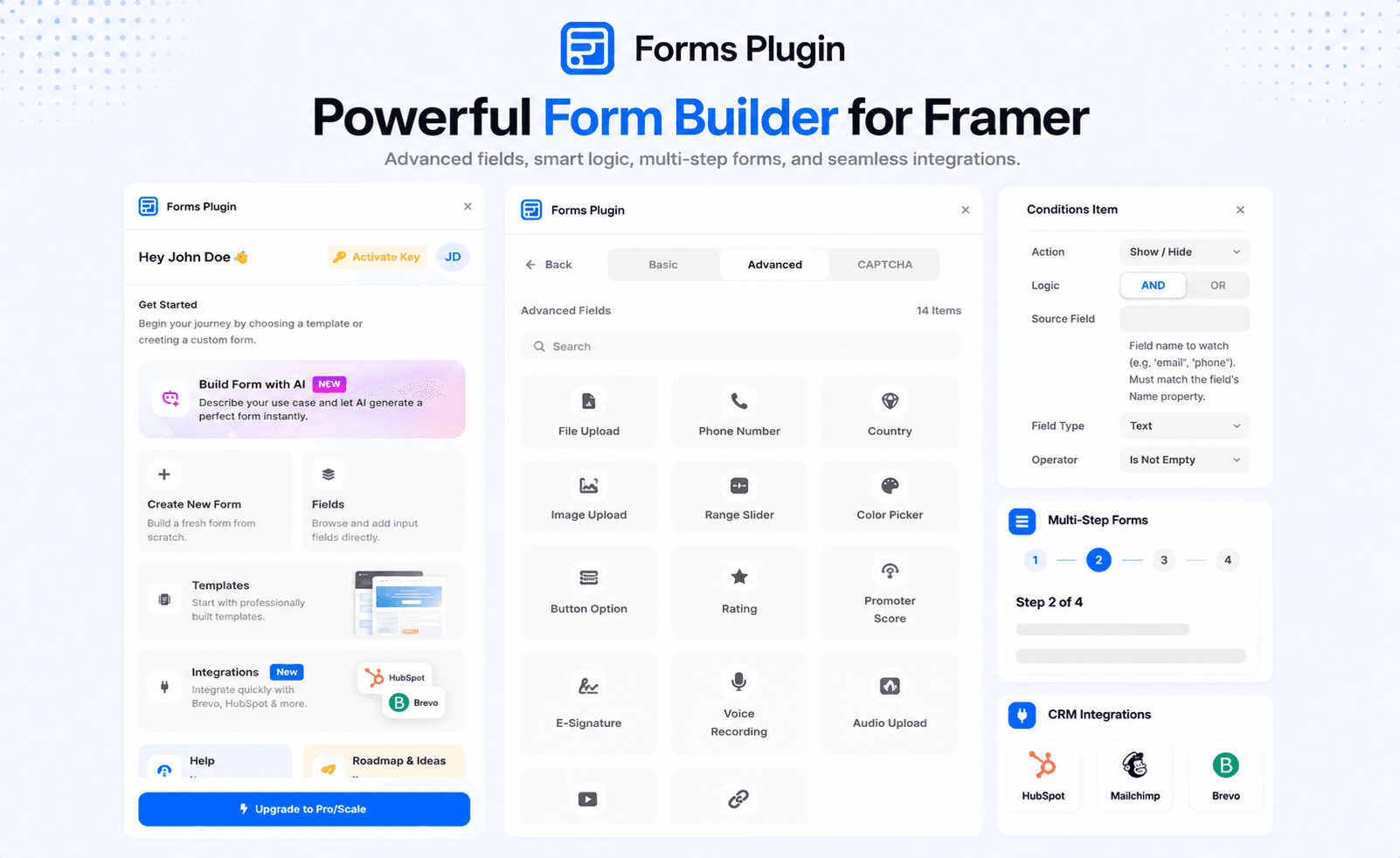
Field types. Look for coverage beyond text and dropdowns: file and image uploads, e-signatures, star ratings, NPS scores, color pickers, and sliders. Our features page lists the full set Forms Plugin ships with, 30+ types across basic and advanced tiers.
Conditional logic. This is the single most requested capability once a form gets past a handful of fields. A plugin worth using should support show, hide, require, disable, and reset actions, triggered by conditions on any field type, not just checkboxes. Our conditional logic page covers exactly how this works in Forms Plugin.
Multi-step forms. Long forms convert worse as a single scroll than as a few short, focused steps. A native multi-step builder with progress indicators and conditional page jumps beats stitching together separate pages by hand.
Integrations. A lead form is only useful if the lead actually lands somewhere your team checks. Native integrations to HubSpot, Mailchimp, Brevo, and similar platforms save you from wiring up a third-party automation tool just to move form data into your CRM.
How does Forms Plugin work as a Framer forms plugin?
Forms Plugin installs from the Framer Marketplace and builds forms as native layers inside your existing Framer project, matching your site's fonts and styling automatically rather than sitting inside an iframe. It covers all four things above: 30+ field types, conditional logic with show, hide, require, disable, and reset actions, multi-step forms called PageFlow, and native integrations across nine platforms.
Pricing is one-time rather than a subscription. A free Basic plan covers a single site with core fields and basic spam protection, no credit card required. Pro is $99 one-time for advanced field types, conditional logic, multi-step forms, the full CAPTCHA suite, and native integrations on one site. Scale is $119 one-time for everything in Pro plus unlimited sites and a commercial license for client work. Full breakdown on the pricing page.
Native Framer form vs a Framer forms plugin, side by side
| Native Framer form | Framer forms plugin (Forms Plugin) | |
|---|---|---|
| Basic fields (text, email, date, phone) | Yes | Yes |
| Advanced fields (file upload, e-signature, rating) | No | Yes, 30+ types |
| Conditional logic | No | Yes |
| Multi-step forms | No | Yes |
| Native CRM integrations | No, webhook only | Yes, 9 platforms |
| CAPTCHA options | Basic spam protection | Up to 5 options |
| Styling | Native Framer layers | Native Framer layers |
| Cost | Included with Framer | Free tier, then $99-$119 one-time |
The "styling" row is the one people underestimate. Whichever plugin you pick, confirm it builds forms as native layers rather than an embed, that's the difference between a form that looks designed and one that looks attached.
What are common reasons people search for a Framer forms plugin?
Most searches for this land in one of a few buckets. A designer hits Framer's native form limits on a real client project and needs conditional logic or a multi-step flow fast. An agency is comparing tools before starting a new build and wants to know what's actually available before committing. Someone migrating off an embedded tool like Tally or Typeform wants their forms to finally match the rest of the site's design.
All three land on the same underlying question: does a given plugin cover the specific gap that's currently blocking the project, at a price that makes sense for how long the site will be live. That's the right question to answer before comparing feature lists line by line.
Framer forms plugin vs embedding an external form builder
The alternative to a native plugin is embedding a form from an external tool like Tally or Typeform. It's a real option, and sometimes the right one if you need a feature no Framer-native plugin has yet.
The tradeoff is visible. An embedded form lives in an iframe, so it doesn't automatically inherit your site's fonts or exact spacing, it loads a separate script on top of your page, and it usually feels slightly bolted-on compared to the rest of your design. Our Tally comparison breaks down the specific differences if you're weighing the two approaches for a real project.
A native plugin avoids all of that by building the form as actual Framer layers. The cost is that you're limited to whatever fields, logic, and integrations that specific plugin has built, rather than whatever a larger, more mature standalone form tool offers.
How do you choose the right Framer forms plugin for your project?
Start with what the form actually needs to do, not the plugin with the longest feature list. A simple contact form doesn't need conditional logic or multi-step support, Framer's native form already covers it. A multi-page intake form with branching questions and a CRM handoff needs all four capabilities from the checklist above.
Then check the pricing model against how the site will be used. A single long-lived business site favors a one-time lifetime fee over a subscription, the math is covered in our lifetime vs subscription breakdown. An agency running many client sites should specifically check whether a commercial license and unlimited sites are included, or whether that's an added cost per project.
Finally, confirm the plugin covers your specific integrations. A form that can't reach the CRM your team already uses just creates a manual export-import step you'll end up automating around anyway.
Frequently asked questions
Do I need a forms plugin if Framer's native form already works for me?
No. If your form is simple, a handful of fields going to email or a spreadsheet, the native form is a reasonable choice on its own. A plugin earns its place once you need conditional logic, multiple steps, advanced fields, or a direct CRM connection.
Does installing a forms plugin replace Framer's native form entirely?
Not necessarily. Most plugins, including Forms Plugin, work alongside the native form rather than removing it, so you can use whichever fits a given page.
Is a Framer forms plugin the same as an embedded form builder?
No. An embedded builder like Tally runs inside an iframe from an external service. A Framer forms plugin builds the form as native layers inside your Framer project, styled by your site's own design system.
How much does a Framer forms plugin typically cost?
It varies by product and by pricing model, subscription versus one-time. Forms Plugin specifically starts free and moves to $99 or $119 one-time for paid tiers, with no recurring fee.
Bottom line
A Framer forms plugin exists to close the specific gaps in Framer's native form: field variety, conditional logic, multi-step flows, and CRM integrations, without forcing you into an iframe. Whether you need one comes down to how complex your forms actually are, not a blanket rule. Check the features page to see the full field and logic set if you're evaluating Forms Plugin specifically, or start on the free Basic plan to test the fit against a real form on your site.
Ready to build smarter Framer forms?
Forms Plugin gives you everything covered in this article - natively, inside Framer.
Get Forms Plugin


 Get this Plugin