Key Takeaways
- Send form data anywhere you actually need it, your own app, an internal tool, a spreadsheet, or an automation, without hiring a developer or paying for a separate plugin just to reach a webhook.
- Stop waiting on a notification email: submissions land in your own system the instant someone hits submit, so you can act on a lead or a data point in real time.
- Built-in retries and request signing mean you don't lose submissions to a flaky endpoint or have to worry about spoofed requests, reliability you'd otherwise have to build yourself.
- Already on Zapier or Make? Connect a Framer form to thousands of other apps without writing code or paying for a dedicated integration.
- Keep CRM connections simple: a native integration is fewer moving parts than routing the same data through a webhook first.
Overview
Your Framer form works fine, but the data is stuck. Every submission lands in an inbox or a spreadsheet, and if you actually need it somewhere else, your own app's backend, an internal tool, a Zapier flow, you're stuck copying it over by hand or hiring someone to build a workaround. There's already a way to skip that: Framer's own form component can send every submission straight to a URL you control, as JSON, in real time, no plugin or custom code required. Most people never notice it because it's sitting in the same Send To dropdown as email and Google Sheets. This post covers what a Framer form webhook actually does, how to set it up, what actually shows up at your endpoint, and when you'd reach for Zapier, Make, or a form plugin instead.
What is a Framer form webhook?
A webhook is a URL that receives data automatically the moment something happens, rather than an app polling for updates on a schedule. Webhooks work on a push model, the server sends data out the instant a form is submitted, instead of you or another tool repeatedly checking for new entries.
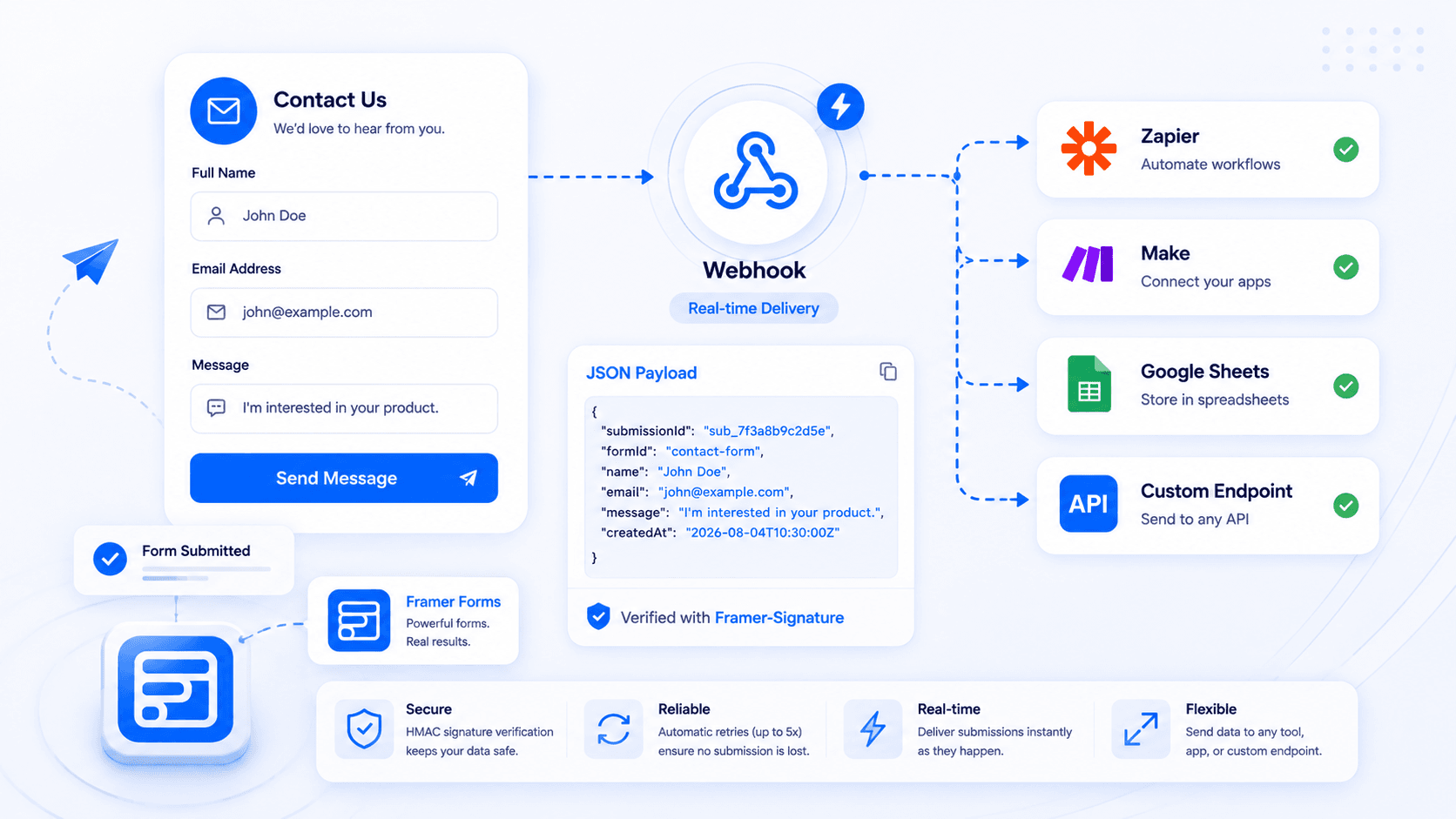
Applied to a Framer form, a webhook means the submission gets POSTed as a JSON payload to a server you control, in real time, as soon as the visitor hits submit. That server could be a custom backend for your app, an internal tool your team already runs, or a simple logging endpoint that keeps a record outside whatever CRM or spreadsheet you're also using.
How do you set up a Framer form webhook?
You set it up from the form's own settings panel: select the form, click Add next to Send To in the right sidebar, choose Webhook, and paste in a URL that starts with https://. Framer publishes the form with that destination active, no separate account or extra component needed.
Once it's live, every submission gets sent as a JSON object, with each input's field name as the key and whatever the visitor typed as the value. Your endpoint needs to return a success status quickly, if it doesn't, Framer treats the delivery as failed and retries with automatic retries up to five times before giving up.
Each request also arrives with a Framer-Signature header, an HMAC hash generated from a secret you set on your end. Checking that signature on your server confirms the request actually came from Framer and wasn't spoofed, which matters if the endpoint is public. This does mean whoever builds the receiving side needs to write a small amount of server code to validate it, Framer's side of the setup stays entirely in the inspector.
What does a Framer form webhook payload actually look like?
Framer's own documentation confirms the shape without publishing a full sample: the JSON uses each input's field name as the key and whatever the visitor typed as the value. So a simple contact form with name, email, and message fields would arrive at your endpoint as something like this:
{
  "name": "Jordan Lee",
  "email": "jordan@example.com",
  "message": "Interested in the Scale plan for 6 client sites."
}
That request also carries the signature header described above, formatted roughly like this:
Framer-Signature: sha256=32c554c6f72fec5f0231533ba17978e2bbaf7714a4b6d35a7fc913e4891d23fc
No timestamp or form metadata gets added inside the JSON body itself, the payload is exactly your form's inputs, nothing more. Framer does send a Framer-Webhook-Submission-Id header alongside the request though, a unique ID per submission that lives outside the JSON body. That header is the one to key off if you need to deduplicate retried or repeated deliveries on your end, covered more in the testing section below.
Can Framer forms send submissions to a custom webhook endpoint?
Yes, that's exactly what the native webhook destination is for. Any HTTPS URL you control counts as a custom endpoint, whether it's a serverless function, a route on your own app, or an internal dashboard your team built.
This comes up often enough that it has its own community thread among Framer builders asking how to route submissions to a backend they own instead of Framer's built-in destinations. The setup is the same either way: paste your endpoint's URL into the webhook field, and everything else (the JSON structure, the retry behavior, the signature header) works identically whether the endpoint is your own server or a third-party automation tool.
The one requirement worth planning around is response time. Your endpoint needs to accept the POST and return a 2xx status quickly, so if your custom backend does anything slow (writing to a database, calling another API) it's worth acknowledging the webhook immediately and doing the heavier work asynchronously behind it.
How do you connect a Framer form to Zapier or Make?
You connect a Framer form to Zapier or Make by pasting their webhook trigger URL into the same Send To field you'd use for any other custom endpoint. Neither tool needs a special Framer integration, because Framer's webhook is already generic enough to talk to anything that accepts a POST request.
In Zapier, that means starting a Zap with the Webhooks by Zapier trigger, choosing "Catch Hook," and copying the URL it generates. Paste that into Framer's webhook field, submit a test entry on your live form, and Zapier captures the sample payload so you can map its fields into whatever action comes next, a Slack message, a new row in a spreadsheet, a task in your project tool.
Make works the same way with its custom webhook module: add a Webhooks module as your scenario's trigger, generate a URL, and paste it into Framer. Both routes turn a raw webhook into something closer to a visual automation builder, which is the appeal if your team already lives in Zapier or Make and doesn't want to manage a server for something as simple as "forward this submission somewhere." Our own Google Sheets guide covers this tradeoff too: Zapier and Make earn their keep once you need a destination Framer can't reach natively, not for the destinations it already handles.
Is a custom code component worth it instead?
Rarely, and only when the native webhook genuinely can't do what you need. A hand-built component makes sense if you need to transform the payload before it leaves the browser, batch multiple submissions together, or add client-side logic the native Send To options don't expose.
For most sites this is overkill. You'd be maintaining a custom component and its dependencies just to reach a URL that the built-in webhook destination already reaches, with none of the retry handling or signature verification Framer gives you for free. Reach for a custom component only after confirming the native webhook or an automation tool genuinely can't do the job.
What are the most common mistakes with a Framer form webhook?
The most common mistake is doing slow work before responding, which triggers retries and duplicate deliveries. A few others show up just as often:
- Not returning a 2xx response fast enough. If your endpoint writes to a database or calls another API before responding, Framer's request can time out and retry, even though the first attempt actually succeeded. Acknowledge the webhook immediately, then do slower work asynchronously behind it.
- Skipping signature verification. A webhook URL isn't secret forever, it can end up in logs, browser history, or a curious visitor's dev tools. Without checking the
Framer-Signatureheader, your endpoint accepts a spoofed payload from anyone who finds the URL, not just Framer. - Not handling duplicate deliveries. Retries mean the same submission can arrive more than once if Framer's original request timed out after actually succeeding on your end. Use the
Framer-Webhook-Submission-Idheader to dedupe if a repeat submission would cause a problem downstream. - Testing only in preview. Webhook delivery, like other Send To destinations, is a published-site behavior. A webhook that looks unconfigured in preview may work fine once the page is live.
- Routing a CRM through a webhook instead of a native integration. It technically works, but it's more fragile and more to maintain than a direct connection when one already exists.
How do you test a Framer form webhook before going live?
Test a Framer form webhook by submitting the published form for real and confirming both the delivery and your endpoint's response, not just that the form looked like it worked. Run through this before trusting it in production:
- Submit a real test entry on the published site, not in preview or the canvas
- Confirm your endpoint received the POST and returned a 2xx response quickly
- Check the
Framer-Signatureheader on your end and confirm it validates against your secret - Return a non-2xx status on purpose once, to confirm Framer's retry behavior actually kicks in
- Submit the same test twice and confirm your endpoint handles a possible duplicate delivery without breaking anything downstream
- If you're chaining through Zapier or Make, check that tool's own run history to confirm the step after the webhook trigger actually executed
When you actually need a webhook instead of email or a CRM
Most contact forms and lead forms are better served by email or a native CRM connection, both are simpler to set up and give you less to maintain. A webhook earns its place when the destination is something email and CRM tools were never built to handle: your own product's backend, an internal ops tool, a data warehouse, or a system that needs the submission the instant it happens rather than as a notification email you have to act on manually.
It's also the right call when you're logging submissions somewhere in parallel to a CRM, for audit purposes or your own analytics, rather than replacing the CRM connection entirely. If you're not sure which camp you're in, a useful test is whether the destination already has a name in your stack. If it's "our own app" or "an internal tool," that's a webhook. If it's a named CRM or inbox, a direct connection is almost always less to maintain.
Where Forms Plugin fits into this
Forms Plugin doesn't route submissions through webhooks for its own integrations, and it's explicit about that on its native integrations page: CRM connections go through a direct API call rather than a webhook or a Zapier step in between. On the Scale plan, that covers Brevo, HubSpot, Mailchimp, ConvertKit, MailerLite, Klaviyo, ActiveCampaign, Drip, and Beehiiv, so if your endgame is a CRM, you can skip the webhook conversation entirely and connect it natively instead.
What Forms Plugin adds on top of Framer's native form is the field types: 30+ advanced field types, multi-step forms with conditional logic, file uploads, and the rest of the advanced form-building toolkit, available on the Pro and Scale tiers. Whether a form built with those advanced fields still exposes Framer's native webhook Send To option in the inspector the same way a plain native form does isn't something we can confirm here, so if a custom endpoint is part of your plan, verify that specific combination before you build around it.
Check the pricing page for what's included at each tier. Both Pro and Scale are one-time payments with lifetime access, not a subscription, which matters if you're comparing the total cost against a Zapier or Make plan that bills monthly for task volume.
Frequently asked questions
Does Framer's webhook work without a plugin?
Yes. Send To > Webhook is part of Framer's native form component, available on the free plan, no plugin required to use it.
Can a Framer form webhook send to more than one URL?
No, one URL per Send To destination. To fan a submission out to several places, forward it from that first endpoint, or from an automation tool like Zapier or Make, to the others.
What happens if my webhook endpoint is down?
Framer retries automatically, up to five times, before giving up. If the endpoint is still down after retries, that submission is lost, so monitoring your endpoint's uptime matters more than it might seem.
Is a Framer form webhook secure?
It's as secure as the receiving side makes it. Framer signs every request with an HMAC signature, but your endpoint has to actually check the Framer-Signature header, an endpoint that skips verification will accept spoofed requests from anyone who finds the URL.
Do I need to know how to code to use a Framer form webhook?
Not on the Framer side, pasting a URL into Send To is enough. Building the receiving endpoint does need someone who can write a small amount of server code, unless you point it at a no-code tool like Zapier or Make instead.
Picking the right path for your Framer form webhook
A short way to decide: if the destination is your own backend or an internal tool, use Framer's native webhook directly, no plugin or third-party account required. If the destination is Slack, Notion, Airtable, or anything else Framer can't reach on its own, paste an automation tool's webhook URL into the same field and let Zapier or Make handle the routing. If the destination is a CRM by name, skip webhooks altogether and use a native integration instead, it's fewer moving parts and nothing sitting in between your form and your data.
The field itself has been available in Framer's inspector the whole time. The decision that actually matters is what's on the other end of the URL you paste into it.
Ready to build smarter Framer forms?
Forms Plugin gives you everything covered in this article - natively, inside Framer.
Get Forms Plugin
 Get this Plugin