
Key Takeaways
- The AI Form Builder is business-aware: it reads your industry and business context, not just a generic plain-English parser, and tailors fields to match.
- You choose single-step or multi-step output before generating, though multi-step forms as a feature are only available on Pro and Scale.
- Every generation shows a preview before anything is added to your canvas, so nothing lands on the page unreviewed.
- AI history saves past generations, so you can re-insert a previous form into a different project at no extra cost.
- AI credits are one-time and plan-based: Basic gets 3 lifetime credits, Pro gets 8, and Scale gets 15.
Overview
Building a form from scratch means picking field types one at a time, then wiring up labels, validation, and layout by hand. Forms Plugin's AI Form Builder skips that first pass: it reads the business context behind your description and generates a structured starting point you can edit from there. Here's what the feature actually does, what it doesn't, and how the credits and plan gating work.
Quick Answer
- The AI Form Builder is business-aware: it reads your industry and business context and tailors fields to match, it isn't a generic plain-English parser.
- Six Quick Start Templates (Lead Generation, Contact Form, Client Onboarding, Event Registration, Support Request, Customer Feedback) give you a ready-made prompt instead of writing a description from scratch.
- You pick single-step or multi-step output before generating.
- A preview is shown before the form is inserted onto your canvas, nothing gets added automatically.
- AI credits are lifetime and vary by plan: 3 on Basic, 8 on Pro, 15 on Scale, and once they're used they don't come back on that plan.
What is the Forms Plugin AI Form Builder?
It's a generation tool built into Forms Plugin. The product's own positioning for it is "Business-Aware Generation": the AI reads your industry and business context and tailors the form fields to match, rather than just parsing a generic sentence into generic inputs. It's meant as a starting point, not a finished, unchangeable form. Full details live on the AI Form Builder page, including a demo video walking through a generation end to end.
How does the AI Form Builder actually work?
You describe the form you need, the kind of thing you'd say to a person setting it up for you: what it's for, and roughly what information you need to collect. Because generation is business-aware, the AI weighs that business context, not just the literal words, when it decides what the form is for. It then generates a form with field types it judges appropriate to the request, rather than you selecting each field manually from the fields panel. Decide on output shape before you write that description, since single-step or multi-step is chosen alongside it, not after.
Quick Start Templates: skip the blank prompt
The AI panel ships six ready-made prompts so you don't have to write a description from scratch: Lead Generation, Contact Form, Client Onboarding, Event Registration, Support Request, and Customer Feedback. Pick one and it fills in a working starting prompt for that use case, which you can still edit before generating.
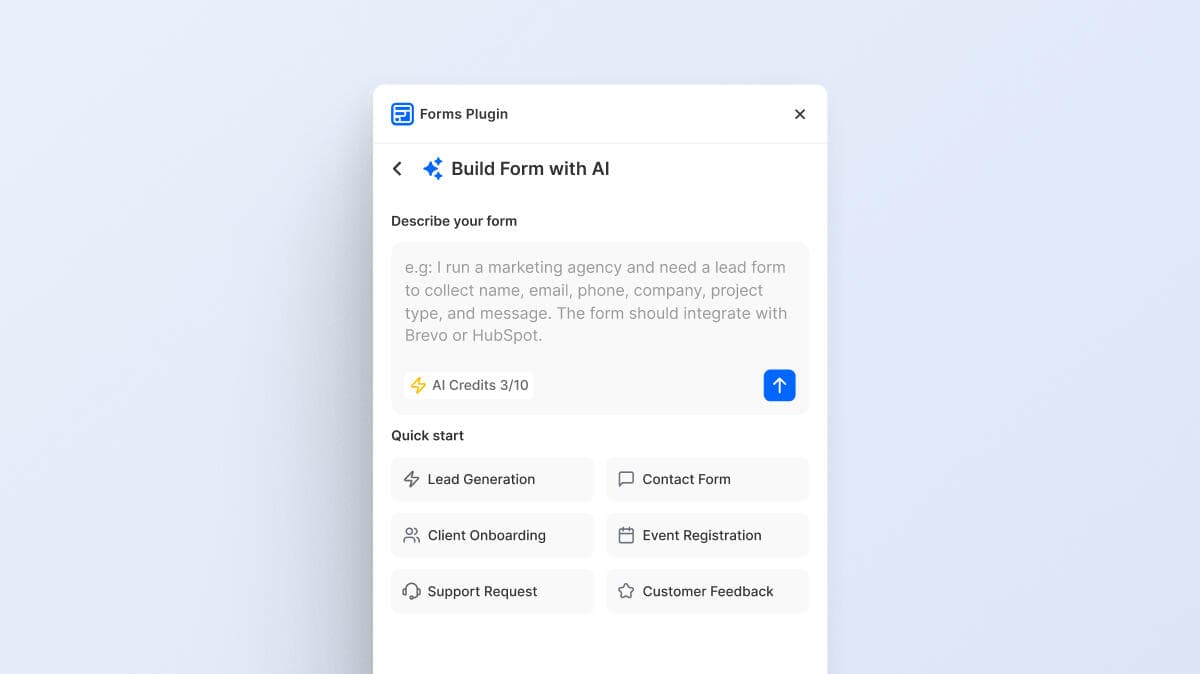
These six cover the most common form categories site-wide: contact, lead gen, onboarding, support, feedback, and event. Anything outside those still works, you just write a custom description instead of starting from a template.
Single-step or multi-step: how the picker works
You choose whether the generated form comes back as a single-step form or a multi-step form split across multiple pages. This choice is made before generation, alongside your description.
Multi-step forms as a general Forms Plugin feature are only available on the Pro and Scale plans, not Basic, per the pricing page. If you're on the Basic plan, expect the multi-step output option to follow that same gating rather than being unlocked independently through the AI generator. If your project needs multi-step output specifically, confirm plan access before you spend a credit on it.
What happens after a form is generated?
The AI Form Builder shows you a preview before anything touches your canvas. You see the generated form, its fields, and its structure first, and only after that do you insert it into your page. Nothing is added automatically in the background.
Once inserted, the form behaves like any other Forms Plugin form. You can add, remove, or rearrange fields, adjust styling, and layer in features like conditional logic the same way you would on a form you built manually.
Does a generation get saved anywhere?
Yes. AI history saves every generation you've made, not just the most recent one. That history lets you go back and re-insert a past generation into a different project without spending another credit, which matters if you liked an earlier result or want to reuse a structure across multiple sites.
AI credits and plan availability
AI generations run on credits, and how many you get depends on your plan, per the live pricing table:
- Basic (free): 3 lifetime AI credits.
- Pro ($99 one-time): 8 lifetime AI credits, plus multi-step forms.
- Scale ($119 one-time): 15 lifetime AI credits, plus multi-step forms, unlimited sites, and a commercial license.
Credits are a one-time allotment tied to your plan, not a recurring monthly refresh, consistent with Forms Plugin's lifetime-payment pricing model across all three plans. If you're deciding between plans specifically for AI generation volume, the credit counts above are the numbers to compare, not just the price.
How does the AI Form Builder fit with the rest of Forms Plugin?
A generated form isn't a separate object from a manually built one. Once it's on your canvas, it can use the same integrations as any other form, routing submissions to a connected CRM or email platform, and it can be paired with conditional logic or turned into a multi-step layout using the same tools you'd use on a form you built field by field.
Building this with Forms Plugin
If you're setting up a form for the first time, starting from a Quick Start Template and reviewing the preview is usually faster than assembling every field manually, especially for common patterns like contact, lead gen, onboarding, support, feedback, and event forms. Anything else still works as a custom description. From there, treat the generated result as a draft: check field types, adjust labels, and wire up whatever integration or conditional logic the form needs before publishing. Full plan details, including AI credit counts, are on the pricing page.
Frequently asked questions
Do I need a paid plan to use the AI Form Builder?
No. The Basic plan is free and includes 3 lifetime AI credits, so you can try the feature without upgrading.
What happens when I run out of AI credits?
Nothing renews and nothing resets. AI credits are a one-time, lifetime allotment per plan, per our lifetime deal breakdown, so once you've used them, they're gone. Upgrading to a higher plan tier is the only way to get more.
Can I edit a form after the AI generates it?
Yes. The generated form is a normal, fully editable Forms Plugin form once inserted, you can add, remove, or restyle fields the same as any other form.
Are there published customer case studies for the AI Form Builder?
None to date.
Is the AI Form Builder the same thing as a template?
No, and there are two different "template" words to keep straight here. A template is a fixed, pre-built form. A Quick Start Template inside the AI panel is just a starter prompt, Lead Generation, Contact Form, Client Onboarding, Event Registration, Support Request, or Customer Feedback, that still runs through generation rather than inserting a fixed form. Either way, the AI Form Builder generates a new structure each time rather than reusing one fixed layout.
Bottom line
The AI Form Builder reads business context, not just literal words, to turn a description or a Quick Start Template into a structured, editable Framer form, with a preview step before anything lands on your canvas and a saved history you can re-insert from later. It's available starting on the free Basic plan, with AI credits scaling up through Pro and Scale and gone for good once spent, and multi-step output following the same Pro and Scale gating as multi-step forms generally.
Ready to build smarter Framer forms?
Forms Plugin gives you everything covered in this article - natively, inside Framer.
Get Forms Plugin
 Get this Plugin